Saturday, November 15, 2008

Dana the Art Student

I have a tendency to jump into rabbit holes. I see something interesting, check it out, and suddenly I'm in another world exploring something completely new. The journey changes, and grows, and something that seemed trivial changes the direction of everything.

It started about three months ago when I watched Garr Reynolds's Authors@GoogleTalk. Joseph had embedded it into the AU Speaker Blog as inspiration for us to make our presentations great.

This 70 minute talk made a ton of sense to me. I had my eyes opened to some ideas about how to make my own presentations and classes better, and I wanted to know more. So, I subscribed to Garr's blog, then I bought his book: Presentation Zen: Simple Ideas on Presentation Design and Delivery (Voices That Matter). Then I bought another book he recommended called Slide:ology:The Art and Science of Creating Great Presentations.

It was when I was reading Slide:ology that I had to step back and say, whoa. I really need to learn more about art and design and visual communication.

My new job requires an intense amount of graphics creation- both static images and recorded "movies". The technical marketing team is in charge of the brochures, product centers, the "heroic imagery" that appears on the product boxes, and tons of other marketing material that are image intensive. Some of these images are photography, others are screen captures. I am often responsible for creating these captures. I feel a bit helpless when setting them up sometimes because I need to:

1) find data that tells a good story

2) stylize it in a way that enhances that story

3) capture it from the appropriate angle

Consider an image of a surface. It could convey a totally different message if you used a black background and grey contours and captured it from above than if you used a cream background, triangles and a realistic visual style. Should it be hilly or flat? Should it be big or small? Is there a river? A mountain? A road?

Then, once I choose it, how do I place it? Where do we use it? Now of course we have creative consultants to help with the actual composition, but I'd like to not be helpless, and there is a lot we do on our own.

I also have been doing lots of animations, demonstrations, creating storyboards for demonstrations, composing images that other people will use in their presentations and tons of rendering. I just felt I was missing some pieces. I need to get better at defining the scope, understanding the audience, understanding the message that needs to be told, working through alternatives, and finally choosing the stinkin' thing. All without winding up in an endless loop of analysis-paralysis.

Once I started exploring the possibilities of taking some design classes (perhaps I was inspired by Pam from the Office) it occurred to me that I never had any "creative" type classes in my engineering education and that kind of annoyed me.

At least when and where I went to school, we didn't learn how to sketch or brainstorm, we didn't have constructive critique of our work, we weren't encouraged to do much conceptual design, sketching or iterations. And I think that this contributes to my feeling that rejected work is wasted.

Au contraire. It's just the first part of the process.

I think this is something that engineering needs more of- especially if we are going to fundamentally change the way that we create neighborhoods, that we improve cities, that we build those big airports in the middle of the ocean and those giant dams that change the landscape of the world forever.

So I'm taking some art classes from the Art Institute's Online Program. The first is called Fundamentals of Design and I just finished my first week's readings in the textbook called Design Basics.

It might as well have been a hallway of curious doors. I know it will help me absorb the ideas and put them into a context which my engineering brain can handle if I blog about it from time to time. And probably tie it into civil engineering and Civil 3D.

Ok, yeah, if I blog about it like every single day.

Thursday, November 13, 2008

Friday Whetstone 11-14-2008

I've spent the past few days in Waltham (Mass) and Manchester (NH) learning new things and discovering things I had forgotten. In Waltham, I was able to spend a day learning about Autodesk Green Building Studio and Ecotect which gave me tons of ideas of how to do better site layout and conceptual design when combining those tools with Civil 3D. We'll talk more about that for sure.

Then, Thursday and Friday I am taking the 7 Habits of Highly Effective People workshop. When I was about 22, I saw the episode of the Simpsons where Bart gets put on Focusin. One of the jokes in the show was Bart reading 7 Habits. So the next day I picked up the book and read it.

It seems like a really ridiculous reason to want to read a book, but I am grateful that I did. The first time I read it, it changed the way I saw the world. Over the past 10 years, I've revisited the material when I felt I was going off course. Every time I think about it, every time I truly get involved in the principles that guide my decision making, I learn more about myself and feel energized to keep going, to keep searching and to keep improving.

While I am already familiar with the material, taking the workshop really forces you to face your life, your decisions, your relationships. It's absolutely not a "time management" class. It's a life mission class.

I have some things to finish tonight before I hit the sack, and I am a bit emotionally drained from thinking hard about life today, so I only have one item to share. I always thought I got a lot of email, but since joining Autodesk, I've been completely overwhelmed by my inbox.

I remember the IT person at Stantec came to my desk one day 10 years ago and said he thought he had screwed up my account because he couldn't see anything in my inbox. And I said.... "Of course there is nothing in my inbox, it's all filed away. Doesn't everyone do that?" Apparently not.

The habit of clearing out my inbox at lunch and at the end of the day got a little weaker over the years, but I still did it at least once every two days. Since August, I'm afraid that I have been living in my inbox and just reacting to things as they come in. I HATE IT.

So while I fine tune my Outlook Rules, and come up with a decent system, I am watching as many videos like this one as I can.

Inbox Zero from Google Tech Talks

I love the Manchester, NH office


Wednesday, November 12, 2008

Analyze Solar Intensity and Shadows in Ecotect

Learning Ecotect today. This is one of the samples. What would an analysis like this tell us? How about- where to put shading, what kind of glass to use, where to plant trees, put landscaping... what to use each space for in the buildings. It's making my mind race. Learn more at www.ecotect.com. I will be talking more about this soon.

[cid:image003.jpg@01C944DD.F40EC680]

Tuesday, November 11, 2008

In Roundabout Ways...

Last week, I hit the Circle in Georgetown, DE to watch the Return Day parade. It was wet and crowded, but really fun. My pictures are terrible, so go look at these pictures taken by Mike Mahaffie.

The best part about standing in the rain for an hour waiting to get through security? Finally freedom to wander the Circle when it is closed to traffic, of course! Our county has a few of these small circles that act as a town feature and traffic calming device.

image

It also reminded me about some lesser known tutorials in the Civil 3D 2009 help file.

Go under Help>Tutorials. Notice on the "welcome" screen it gives you a chance to get the tutorials in pdf- so you can print out a segment to read on the bus ride home.

Dig in under AutoCAD Civil 3D Tutorials > Advanced Corridor Design Tutorials and see Intersection and Roundabout Design lessons.

image

Do the lessons, then amaze your friends! Learn how to model roundabouts in Civil 3D. The principles should apply to interchanges, traffic circles and more.

image

And if you need help navigating the roundabout you just designed, watch this video.

Monday, November 10, 2008

Do you use named views? Why the heck not?

My work lately involves creating drawings that need to move quickly from one "look" to another. This usually involves turning on/off layers at the very least, but I also need to be able to switch perspectives, apply visual styles and change background colors.

I thought of it today while queuing up some drawings for screen captures. If you ever need to show progression- they work great because it remembers the EXACT dimensions of your view so that you never have to worry that they won't overlay properly. I used the same named view to progress through applying different styles in the Google Presentation below.

I've also used them for some "time progression" captures where you add more elements to show construction over time. Kind of an oversimplified version of 4D Scheduling in NavisWorks.

Using saved views gives me the power to show off the product (or a project) with minimal button pressing- but it is also a great CAD management tool.

At a minimum, its a way to remember the layer state AND the zoom. You can use it to remember how you want to see something in model space, then set that view currrent in paperspace. You can use it while you work so you don't have to constantly zoom and pan around. As you get more skilled, you can drag and drop them from sheet set manager into layouts, and much more. (Brush up on your sheet sets with classes at AU Online and the Sheet Set Manager Best Practices White Paper series)

image

I find it nearly impossible to use Named Views without the View toolbar, so add that to your workspace. Once you get used to using Named Views, you'll want it handy. I rely on it heavily.

image

image

image

image

Friday, November 07, 2008

It's Your Patriotic Duty... to Buy Some Stuff

I was so psyched to see Anthony's blog come back to life, and I was intrigued by his post today about Section 179 and the special 50% depreciation allowance.

I also found something about it here: 2008 Economic Stimulus Act Provides Tax Benefits to Businesses and here: President Bush: Stimulus package will help in 'very trying time'.

And of course, there is a youtube video for everything these days, eh?

If you are considering making the change from Land Desktop to Civil 3D, give your reseller a call and they can help you take advantage of this opportunity.

There are so many ways to regroup and seek new opportunity. Let's find them together.

Friday Whetstone 11-7-2008

So I'm trying to become a better person- you know taking time to "sharpen the saw" and all that rot. This means putting aside the rat race for a few minutes a week and learning something new that will help the rest of my week go more easily.

  • Today's webcast is Rolling Deployment Series: Parcels with Jerry Bartells. Sign up, grab some friends and watch. If you are on the east coast, make it a habit to brown-bag lunch together. If you are elsewhere, just let it run in the background while you work. I find that if I don't watch them live, I tend not to watch them at all. Make the commitment. Even if it is something you know, you will definitely pick up new things and new angles.
  • The TED talks are wonderful for helping me get ideas for my own public speaking and presentations as well as being nearly as entertaining as the SNL clips on youtube. You can subscribe to the podcast on iTunes for watching on planes and at the gym, or you can stream from the website: http://www.ted.com/talks. Talks vary from about 5 minutes to much longer, so even if you only need some inspiration while you drink that first morning Mountain Dew, you will find the right video.
Here is a good one to start with- short (3 mins), sweet and coined a new word in my vocab- "Work-a-frolic". Richard St. John: Secrets of success in 8 words, 3 minutes

  • This morning, I was faced with about 300 unsorted inbox messages from the past few days, and I felt my skin start to prickle in that horrible panic attack way. So I am taking a few minutes over my coffee break to work through Get Out of Your Inbox with Outlook 2007. I found a whole host of free Microsoft Office lessons and they only take a few minutes to work through. I've already learned a few things that will help me- and its given me ideas of what I can study up on to get even more skills to tame the inbox tiger.

Wednesday, November 05, 2008

Thoughts on the Buddy Pass

You know, I was thinking. There were always people in the office that really would get a lot out of AU. Like when I was a reseller- the sales folks really could benefit from sitting in on a few classes to get a feel for the tech, and to see the exhibits. It was great brain food. There just never seemed to be the budget for it.

Or your friends right now that might be looking for work or looking to change careers. They probably wouldn't mind sharing your hotel room for the chance to learn something new- perhaps about AutoCAD, Map or maybe even some 3DS Max. Not to mention the thousands and thousands of exhibitors, instructors, support staff and attendees who just might have a job for them. Or a lead for a job for them.

What about the project managers? The owner? The non-engineering types in your office? Landscape architects, urban planners. Folks that might not have considered coming- until now when they can get in for (maybe) free or for $595.

USE YOUR BRAIN- think of ways to take advantage of this opportunity. We need more people to be sharper, have more skills, have more brainstorms, more big ideas. Autodesk University is a great way to get that excitement going.

http://au.autodesk.com/event/buddypass/

Don't forget about the AU Buddy Pass

Set your alarm for 9:00AM PST (that's NOON over here on the east coast)

http://au.autodesk.com/event/buddypass/

The AU 2008 Buddy Pass Offer from Autodesk

The Buddy Pass offer begins at 9:00 a.m. (PT) on November 5.

The first 100 people to register and fully pay for a regular* AU 2008 pass can invite a “buddy” to register for free.

When the 100 free Buddy Passes are gone, people who register and fully pay for a regular AU 2008 pass can invite a buddy to register for only US$595.

In addition, anyone who registered and fully paid for a regular AU 2008 pass before November 5 at 9:00 a.m. (PT) can also invite a “buddy.”

Please Note:

  • Only one (1) Buddy Pass per fully paid regular AU 2008 pass.
  • If the regular pass is canceled, the Buddy Pass holder must pay US$2,345 for a full, regular AU 2008 pass.
  • The AU 2008 Buddy Pass offer is for a limited time only. Autodesk may end this offer at any time without notice.

* Regular = four-day, all-inclusive

What’s Included In the Buddy Pass—and What Isn’t

  • Buddy Passes provide full access to all AU 2008 classes and functions.
  • Buddy Passes do not include hotel.
  • Buddy Passes do not include pre-registration for classes and labs—the Buddy Pass holder may attend classes and labs only if there is room available.

Who’s Eligible—and Who Isn’t

  • Those who register and fully pay for a regular four-day, all-inclusive AU 2008 pass qualify for the Buddy Pass offer starting on November 5 at 9:00 a.m. (PT).
  • Those who do not qualify for this offer include AU Speakers, AU Exhibitors, and Autodesk employees.

How to Take Advantage of the AU 2008 Buddy Pass Offer If…

You Are NOT Currently Registered for AU 2008

Register online on, or after, November 5, starting at 9:00 a.m. (PT).

A site notice will tell you if:

  • A free Buddy Pass is still available—or
  • A US$595 Buddy Pass is still available—or
  • The Buddy Pass offer is no longer available

If a Buddy Pass is available, and you complete the registration process, during confirmation a promotion code will be generated. Give that code to your buddy to use when registering. Depending on which Buddy Pass offer is available to you, your buddy can register for free or US$595. If the Buddy Pass offer is no longer available, no code will be generated, and no Buddy Pass will be offered.

Note: Online registration ends November 14.

You ARE Currently Registered for AU 2008

Contact the Autodesk University Registration Team—see contact information, below—on, or after, November 5 starting at 9:00 a.m. (PT), and request a Buddy Pass promotion code.

A member of the AU Registration Team will tell you if:

  • A free Buddy Pass is still available—or
  • A US$595 Buddy Pass is still available—or
  • The Buddy Pass offer is no longer available

If you hold a regular, fully paid four-day, all-inclusive AU 2008 pass, and a Buddy Pass is available, you will be given a promotion code. Give that code to your buddy to use when registering, and, depending on which Buddy Pass offer is available to you, your buddy can register for free or US$595.

To call or email the Autodesk University Registration Team:

1-888-371-1722 (toll-free in the United States)
1-415-446-7717 (outside the United States)
autodeskuniversity@autodeskevents.com

Criteria Based Design for Alignments

I'm just up late because apparently Prospector really wanted to watch the Obama speech. He's back to sleep, but I am now quite awake.

So, in the spirit of tomorrow's Criteria-Based Design Webcast, I'd like to give you a super short introduction to the concept of criteria-based design for alignments. I figured that you might have a bit of the same blank look on your face that I did when I first heard the term. Then I quietly sidled up to Mr. Funk and asked him to explain it to me. He did, and now I know. I can shield you from such humiliation with a few key points.

When you create an alignment in Civil 3D 2009, you get the option to select criteria based design. You also get an option to check a box for design checks. We'll talk about design checks later.

image

There are several design criteria files installed with Civil 3D 2009 that are based on AASHTO standards for a variety of design speeds and road configurations.

If you work in another country, check your country kit. I looked through a few of the country kits and found that many of them had criteria files for the appropriate regulating agencies.

When you start to draw your alignment, a little warning glyph will appear when you have violated the criteria established for that design speed.

image

Panorama also lets you know that something needs attention:

image

I'll save design checks for another post, but in a nutshell, you can build simple expressions to check your work- for example- warn me if I draw a tangent less than 100 ft long. I'll be watching the webcast myself and see if I can't pick up a few skills and ideas.

There is also Criteria-based design for profiles.

Register for Wednesday's webcast here and download the transportation white papers here.

Tuesday, November 04, 2008

Go Vote and Get Oyster Fritters!

Don't forget to vote!

The World is Our Oyster

Our local election has a tight race. Since everyone around here is related somehow, I am actually related to one of the candidates. OK. I'm not really related, but he's the architectural designer who designed and built my house for his own family. In fact, as I type this I am sitting in the room he built to be his home office/studio. He sold the house to another prominent local figure- the pastor of one of the biggest churches in our county. I bought the house from Pastor Danny's family. So I have to wonder if this house has some magical pixie dust that launches Higglytown Heroes.

Usually the conversation goes something like this:

"Oh, you live on XX Road?"

"Yes, I do!"

"Which house are you? Let's see, there is the one on the corner, then the one with the nice flowers, then Pastor Danny's old house that has never been the same since it changed hands with the two mean dogs and the overgrown garden, then the nice log home, then the new estates."

"Yeah. Um, the log house. That's us."

Monday, November 03, 2008

Webcast this Wednesday: Criteria Based Design

We all know about the Friday Webcasts with Lucy, Jerry and the gang, but there is a lesser known series sometimes on Wednesdays called the Government Road Design Solutions webcasts. These webcasts focus on the needs of Civil 3D users who design DOT projects, local road projects, road rehabilitation projects and more. If you do any kind of road design, you will find these webcasts very useful.

Many of the upcoming and recorded webcasts in this series are inspired by the Road Design and Road Rehabilitation White Papers.

Take a minute and register for everything listed there so that you don't have to remember later. There is some good stuff coming up.

Also check out some of the recorded webcasts listed there:

Saving Time During the Early Phases of Road Design

Saving Time and Reducing Errors with Machine Control Systems

Best Practices for Utilizing Aerial Photogrammetry

Streamlining the Roadway Milling and Overlay Process

AutoCAD Civil 3D Survey Solutions

Roadway Design Using AutoCAD Civil 3D

Time Saving Tips in the Transportation Design Workflow

And I was extremely impressed with the robust list of Civil 3D transportation tutorials in the sidebar:

Generate 3-D Planimetrics From .dgn
Surface and Catchment Area Development
Corridor Enhancement

Linking Corridor and Feature Lines

Feature Line Enhancement
Global Origin File Centering
Integration of Corridors, Feature Lines, and Grading
Multi-Coordinate Systems and Data Rectification
Survey Functions of Civil 3D
Integration of GIS Data with Civil 3D Survey Functionality

Visualize Your Surface Analysis

11-3-2008 2-45-28 PM This is a trick that I discovered by accident when I was preparing for my Civil 3D for Hydrology class two years ago. (Find recorded version and paper from 2007 at AU Online.) I ran into a use for it again today and wanted to jot something down quickly before I forgot. And once again, if I already blogged this somewhere, or if someone else has, forgive me.

For reference, here are two posts I wrote about doing surface analysis:

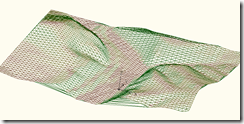
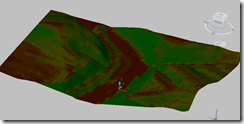
I wanted to see a slope or elevation analysis in 3D as solid colors.

In the surface style, change the Display Type to 3D Faces.

11-3-2008 2-39-07 PM

Make sure that the analysis type is visible in MODEL view (Civil 3D 2009) or whatever the 3D view was called in 2008. (3D? My memory is short.)

11-3-2008 2-39-39 PM

Run your analysis, then switch to an isometric view.

11-3-2008 2-44-55 PM

Make the realistic visual style current.

11-3-2008 2-45-49 PM

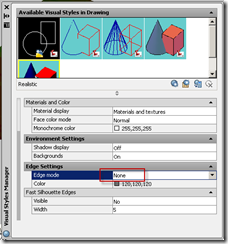
If you don't like the shadowy grey triangles, edit the visual style to turn them off.

11-3-2008 2-42-48 PM  11-3-2008 2-45-28 PM

The Creative Kick to the Solar Plexus

I had one of those weeks last week that we all know is just part of our job, part of the process, part of life. It was one of those weeks that they don't tell you about in engineering school, so the first time it happens you are completely godsmacked. And each time it happens thereafter- it still is like a kick to the solar plexus.

You spend weeks preparing something. You throw heart and soul into it, you run into road blocks that you overcome in creative ways. The final push is tough, but good tough. Like a morning run in the fall sunshine or paddling a canoe through rapids. Then- the event happens. It's a public hearing, a client meeting, or an agency review.

When you get the the meeting, you find that your design is rejected. Perhaps it's because you really weren't listening to what they wanted, and you need to regroup. Or you were talking to the wrong person and the actual decision maker looked at you standing there, sweating in the projector lamplight- exposed and vulnerable- and laughed (or worse). Perhaps its because the law just changed, or new councilmen were just elected. Perhaps something happened beyond your control- a fight amongst heirs, the discovery of dinosaur bones on the site or the collapse of the housing market in that area.

Whatever the reason, you leave the meeting with a feeling of waste. That the time and energy spent creating this particular set of plans would have been better spent with your kids, or cleaning the gutters or listening to the generic jazzy tunes piped into the hazy beige aura of Starbucks.

But that is not the case.

These false starts make us better. They keep us creative, they keep us sharp. The lessons learned in putting things together make us better for next time. We can sharpen our strategies and tell the same story again in a different context. In some ways, this is how I treat blogging. It gives me a chance to get my thoughts together in a rough, but still somewhat formal way, so that in the future I have an arsenal of ideas that can be refined to meet a new need.

A great example in my life is the river class I taught at AU 2006. While many who attended seemed to think it was decent, the reviews were a mixed bag and in my head it didn't go nearly as well as I had hoped. But slowly and surely over the past few years that story has been refined. My techniques have improved- both technically and with documentation. I wrote more blog posts, did more experiments, even a webcast (Alternative Uses for Corridor Models: Channels, Streams, and Ponds). Some firms took the idea and ran with it creating their own success stories surrounding river restorations. And now, here I sit, still referring to those original ideas as I shape the environmental story for Civil 3D.

I remember wishing with all of my heart as I crept out of the classroom that I had never submitted that class. It was frustrating to put together, I had never taught before- why did I have to pick something so hard to put together? I'd never written anything longer than a blog post- and I still cringe when I look through my paper.

But the truth is that if I had never gone through that process for something "real", I never would have been able to build on it.

So whenever I am faced with the situation where I am standing outside a board room door holding a milk crate full of visual aids and wearing a suit that I pressed at 4AM while rehearsing to my timed powerpoint and someone sticks their head out and says "You know what? We really don't need to see your stuff, we're headed a different direction", I can resist the urge to beat them over the head with a TIS.

If you need some more reminders of why you are here, check out some of the videos at ://www.youtube.com/user/civilengineeringtv

Saturday, November 01, 2008

A Civil Engineer's Trip to Paris

I had a few free hours to wander around the city on foot when I went to the Autodesk offices for a two day session with some of the European Technical Specialists.

Unfortunately, the sewer museum was closed. I know. BUMMER. I wrote down the museum hours so that next time I am sure not to miss out.

There was about a fifteen minute walk to the Autodesk Office from my hotel. The hotel was on the north side of the River Seine (the Rive Droit) and the Autodesk offices is on the south side (the Rive Gauche).


View Larger Map

I took a few pictures.


I showed my mother this picture and she commented on the lovely river and the bateau moche.

DSCN8435

I shook my head and pointed out the LaFarge concrete plant. In case you were worried, I also got a few shots of the concrete trucks.

DSCN8437

My hotel was adjacent to Parc de Bercy. One end of the Parc has a rather large wall, and through that wall there are what seem to be culverts.

 DSCN8447

This is the view from the other side of that wall. I walked closer and noticed that there are some kind of gates tucked in under this bridge- almost as if the road could be sealed off. Since this is right along the river, I had to wonder if this was part of some elaborate flood control scheme.

 DSCN8438

I asked Willy Luce if he knew about it, and he said it was possible but didn't know for sure. I spend some time googling the subject and didn't find much to clear things up. My French is limited, but improving, however I still struggle coming up with Google Search terms that make contextual sense for French civil engineering. Mostly they wind up sounding something like "tasty river overspill prophylactic" or some such.

The park was very nice and had a different feel from most city parks I've explored in the past. It was very geometrical- lots of squares and symmetry. It also maintained some neat historical features.

I liked little quirks like this tree. It seemed that the landscape architect wanted a path through here to keep the geometry the way s/he wanted it, but there was a lovely old sycamore in the way. The solution?

 DSCN8446

The whole Bercy Village neighborhood had cobble stone streets with the original cart tracks still intact.

 DSCN8451

 DSCN8480

A few other neat things that I noticed everywhere on my walks:

Moped Vending Machines. Pay, ride, return to another vending location. Very neat.


DSCN8462

Bike paths that weren't quite in the street, but not really sidewalk either.


DSCN8441

And stoplights that showed opposing traffic that they were red.


DSCN8472

One day I walked all the way to the Quatier Latin but forgot my camera. There were so many wacky catch basin covers that I couldn't take photos of! I just trying googling for some possible photographs (translation: the lid of aggregate conveyance waste tubes), and I stumbled upon this devine site: www.sewerhistory.org. While this page doesn't have shots of the artistic fillagreed draincovers that I saw, it does have a whole page that talks about manhole covers in the Roman Empire and more!

There are quite a few Civil 3D users in France and there are more and more coming every day. I was truly impressed by some of the projects that Willy was showing me, and I am looking forward to future trips to Paris to learn more about how I can help make them successful.

I hope that next year I can plan to attend Infrastructures et Territoire 2008 next year (I didn't know about it soon enough to make travel arrangements for this year.)

Pour mes amis francophone: J'essaie d'attendre "Les lundis de L'Aménagement du territoire" Des "webcasts" avec Willy Luce et ses collègues à 16h (Paris) ou 10AM EST.  Aussi- nous avons commencer un groupe de discussion: 

Autodesk Groupes en Francais

Thursday, October 30, 2008

What is the difference between AutoCAD Civil 3D and AutoCAD Civil?

A few months ago, Autodesk came out with AutoCAD Civil.

So now you have a choice.

AutoCAD Civil 3D 2009

or

AutoCAD Civil 2009

A lot of folks have been asking questions about which one is right choice for their office and their work.

My team recently put together an interactive tool to help you figure out what the difference and what is the right tool for you. Please go take a peek and let me know what you think so that I can incorporate your feedback into similar tools in the future:

Click here to Visit the Civil 3D 2009 vs Civil 2009 Interactive Site

You'll need to really sit down with your reseller and your team and figure out what is the best mix for your firm. You can have all Civil 3D, or all Civil, or a mix of the two. Many firms will find that a mix of the two are a good choice.

Another resource you will find helpful is the Autodesk Civil Engineering Solution Questions and Answers paper. It spells out a lot of the nitty gritty details about licensing, what features are included in Civil vs. Civil 3D and the scoop on Land Desktop. Be sure to check out the comparison matrix on page 2 (shown below):

image

image

Change Your Daylight Subassembly without Messing Up the Target Mapping

I heard some chatter about this trick a few months ago on some of the discussion groups, but I haven't had a chance to try it until now. Someone else may have blogged about it in the meantime, but I'm a bit fried today and my search turned up nothing. These are usually the moments when someone tells me that I blogged about it a year ago. That would be funny.

Anyway.

You put some daylighting on a subassembly. Then you realize, shoot, you'd like to use a different type. Today I had DaylightGeneral, but later decided that DaylightMaxWidth would be better.

1. Simply select the subassembly in your drawing.

2. Then right-click on the subassembly on your tool palette.

3. Select Apply Tool Properties to Subassembly.

image

4. You will see the subassembly switch. Your surface targets should remain intact- at least they did for me. I can't promise that it will stick in every situation.

A few potential pitfalls: It will literally apply the properties including left/right. You will have to go into the properties to flip it over if it comes in wrong.  Also, it won't change the name of your subassembly. So if you've left the default DaylightGeneral(4999) or whatever name, you'll be confused. So name your subassemblies something meaningful, ok?

This trick should also work for other types off assemblies. Let me know what you run into.

**I figured out where I first saw this discussed. Check out this thread on The Swamp. Also, check out some of Michael's video tutorials here.

Using the HEC-RAS Extension for Civil 3D 2009- a Video

I'm in the midst of some intense preparations for Autodesk University- I'm lucky enough to be helping out with some of the things that will likely be shown on the AEC Mainstage- so I only have a few minutes for lunch today- so this will be short.

I recorded a short video to help people see how to use the new HEC-RAS Extension for Civil 3D 2009 that is available for subscription customers. I uploaded it quickly to Vimeo as a test. There is no sound. Watch the video (full screen seems decent) and tell me if this is a good way to share quick "how-to" videos in the future.

In a few days, I'll post a more robust explaination of the tool and show you some more about it.


How to Export from Civil 3D and Import into HEC RAS from Dana Probert on Vimeo.

What is a Chicane?

I was putting together some demonstration videos a few weeks ago, and had the idea to mix in some concepts from Context Sensitive Design and Traffic Calming.

image

I'll post some of my videos in a few days, but in the meantime I found this very neat animation that explains what a chicane is with PLAYDOUGH, which after Civil 3D is my favorite medium.