Saturday, June 03, 2006

Cooking with the Civil 3Diva: DescKeyCheesey Broccoli Soup

I really should have picked my broccoli last week before the June Caterpillar Invasion.  I spent the morning picking heads of broccoli then doing caterpillar extraction surgery on them.  It’s OK, ‘cause little Panorama got to help and she loves broccoli.


Which brings me to this week’s recipe.  It’s an easy way to feed your family and build your brain to keep you strong for more Civil 3D acitvities.  My Civil 3D assignment for the afternoon is migrating a set of Land Desktop Description Keys into Civil 3D 2007.  A cozy, rainy afternoon activity that benefits from comfort food high in calcium and folic acid.  Makes great leftovers, too, for those late nights importing perfectly formatted points.


CIVIL 3DIVA DESCKEYCHEESEY BROCCOLI SOUP

-1 (10 oz.) pkg. frozen chopped broccoli, thawed OR all the broccoli from your garden

-1/4 cup chopped onion

-2 tbsp. butter

-1 tbsp. flour

-2 cups shredded Cheddar cheese

-Salt to taste

-5 cups milk (or half-n-half)

-OPTIONAL- non poisonous garden caterpillars, to taste.  (for a brainfood protein boost!)

PREPARATION:

Combine all ingredients in slow cooker. Stir well. Cook on low for 2 1/2 to 4 hours. If soup is too thick, add a little more milk.


Friday, June 02, 2006

Health and Beauty Tips for the Civil 3D User

Here are a few quick "Health and Beauty" tips for users of Civil 3D from the Civil 3Divas:

To keep your pep up after a day of staring at the screen, go over to the large format stapler in the office. Place your hand inside and slam it a few times. Wakes you right up!

Getting rid of unsightly calluses on the pinky-side heel of your right hand from over-parceling is easy! Simply soak your hands in a mixture of one part parcel juice and two parts jiggy. Like Magic!

Table that Lists Area and Volume at a Contour Elevation

Here is a procedure to help you make a surface contour table style that will produce a listing of contour areas and volumes.

The screen captures are directly from Civil 3D 2007, but the process should be the same in 2006.

As always, please let me know if I missed something or if this is not what gets the job done.

I have a simple surface that represents a pond.


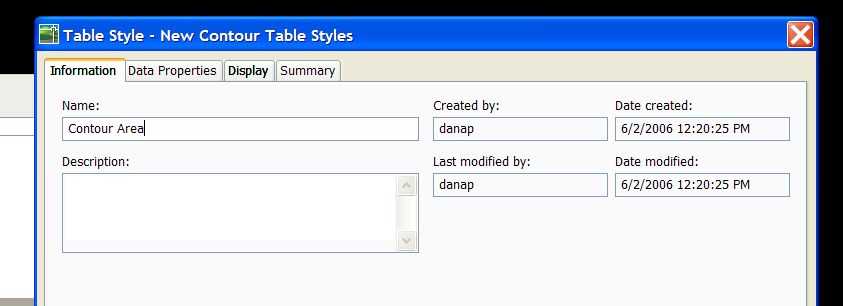
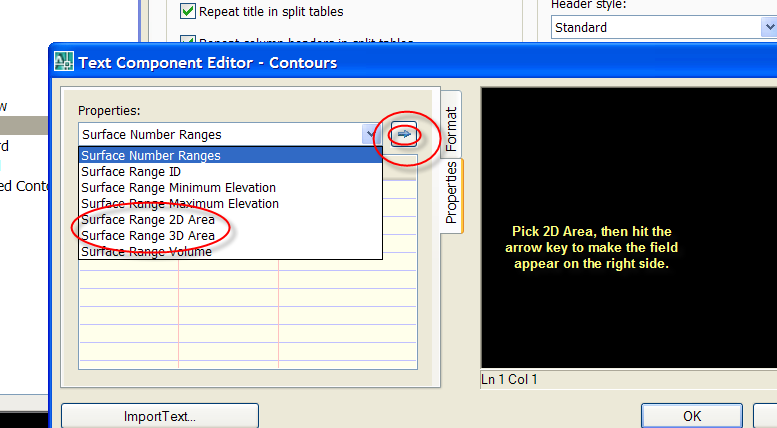
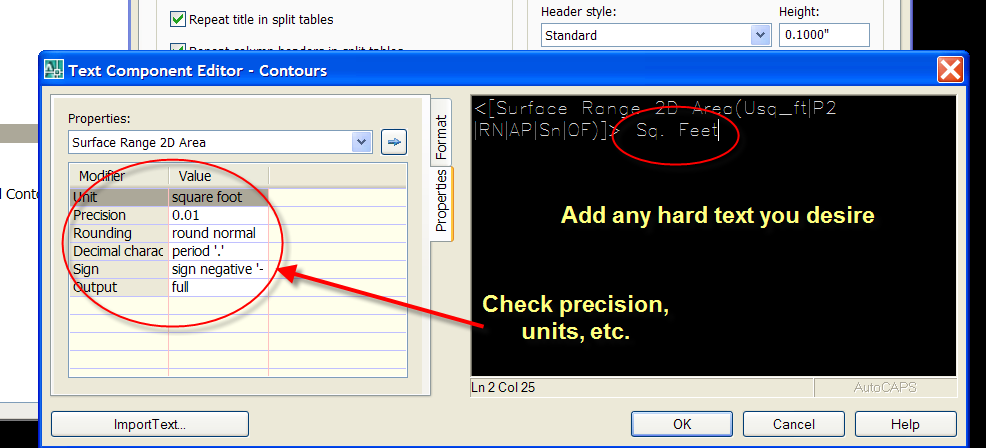
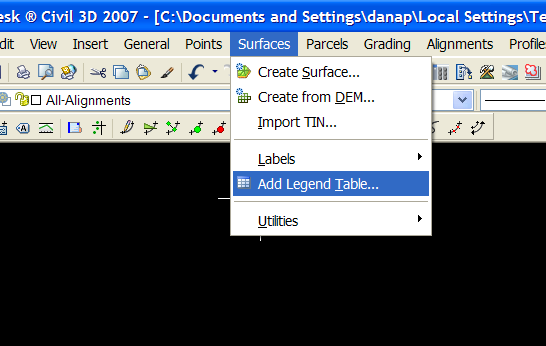
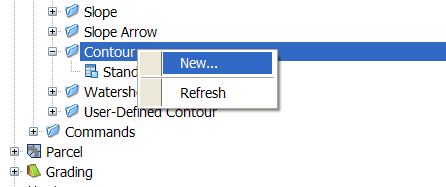
Go into the Toolspace>Settings Tab and make a new Surface Table Style under Contour.


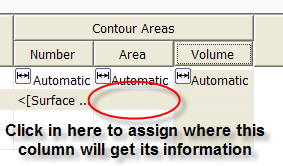
Bring in your table.


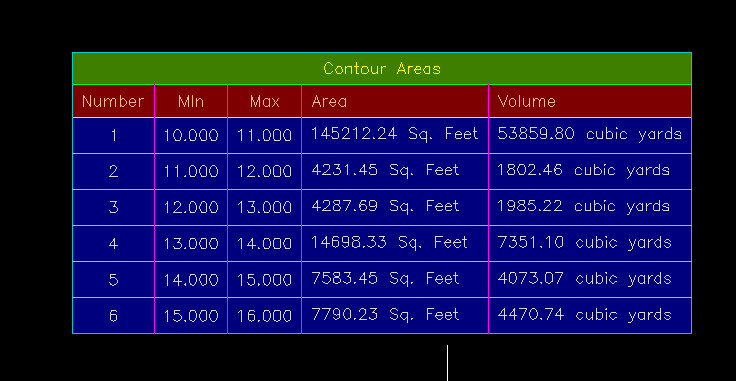
Note that the table is blank right now. Any time you do a surface analysis, you have to “crunch” the numbers for the table to populate with data about that specific surface.

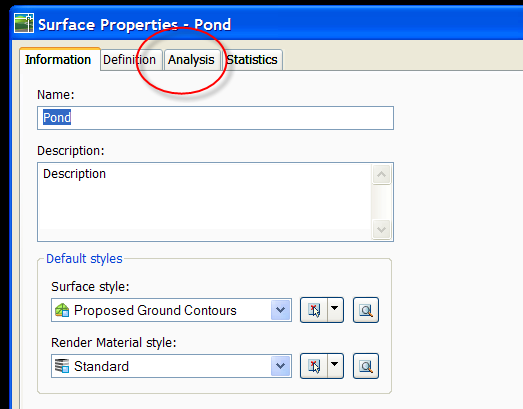
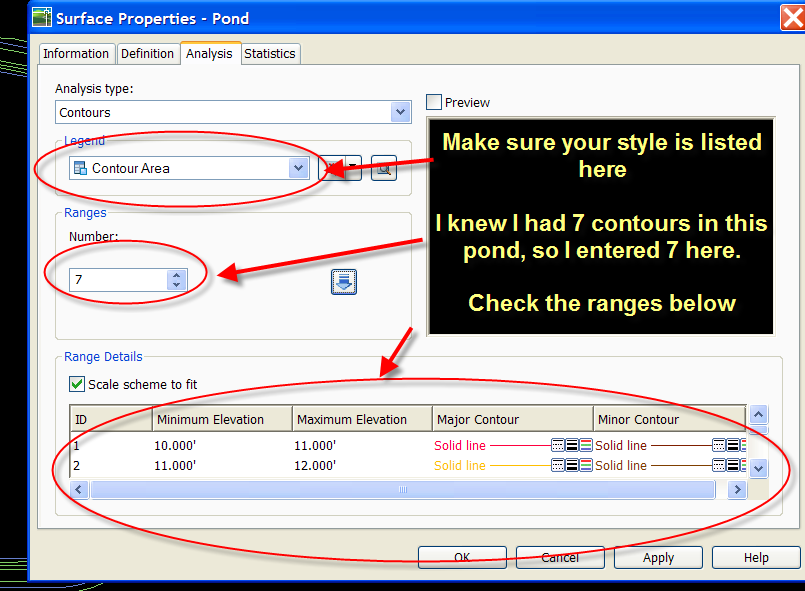
“Crunch” the surface under the analysis tab.


Note that technically speaking, the area and volumes listed are for each range of elevation, i.e. the area between elevation 1 and 2 for example. If that doesn’t get you what you need, you can make ranges like 10 to 10.000001

Also, you can make an object style that shows off the analysis we just did. I won’t capture that here, but if you are familiar with surface styles, it isn’t hard at all.

Alternatively, you can do an elevation banding style and elevation area table to get the job done.

Beneath The Lines: Vault for Advanced Users

Beneath The Lines: Vault for Advanced Users

This is a great post from Jason's Blog about Vault for those who are using/considering implementing it on a large scale.

Remember: Vault IS NOT required for Civil 3D 2007.

GIS Conference Power Points Posted

I posted my powerpoint presentations from yesterday for anyone who might be interested.  They are in the files area of the yahoogroup. http://groups.yahoo.com/group/cadapult_civil/files/


You do have to be a member of our yahoogroup to get them- but remember- everyone is welcome! (go to http://groups.yahoo.com/group/cadapult_civil/ to join and read archives)


http://groups.yahoo.com/group/cadapult_civil/files/ 


GIS Conference Follow Up

Here is the list of links from my presentation yesterday at the Delaware Geographic Data Committee Conference.


Later today, I will post procedures for how to do:


  1. New 2007 SHP reference
  2. New 2007 theming
  3. “Old School” Theming
  4. Polygon Topology and Overlay Polygon Topology


Any more requests?  Post a comment.


The National Map

I used it to find out the names of my 1:250 USGS Quads

http://nationalmap.gov/


Geospatial One Stop

I used it to get the National Wetlands Inventories for my Quads

www.geodata.gov


Delaware DataMIL

I used it to get Municipal Boundaries, State Boundaries and others

http://Datamil.delaware.gov , specifically: http://datamil.delaware.gov/?c=RESOURCES&s=DEVECTORS


Sussex County, Delware

I used it to get parcel polygons for Sussex County tax parcels

http://www.sussexcountyde.gov/ , specifically: http://www.sussexcountyde.gov/departments/mapaddress/gisdata.cfm


National CAD Standards

This came up in my afternoon “CAD and GIS working together” Session

http://www.nationalcadstandard.org/


Wednesday, May 31, 2006

Another Blog and CAD-Celebrity Story

No list of blogs is complete without mention of the greatest CADiva ever.

Lynn Allen's Blog
http://lynn.blogs.com/
I learn something new at LEAST three times a week from Lynn's blog. She's got it all. Looks, brains, every male AUGI heart, private jet... well I don't know about the jet. Beth and I have a bit of hero (heroine) worship for Lynn.

So this year in Dallas at our annual Nerd Round Up (aka Bootcamp) Beth, JR and I were sitting at a table eating lunch and talking about how cool Lynn is and how we'd love to meet her. JR mentioned that at AU this past year he literally bumped into her. I said "OHMIGOD, did you pluck out a hair for your scrapbook" .... And....

Just as I said that, a voice to our left said "Do you mind if I join you guys?"

And it was LYNN. True Story.

Blogs for the Hard Core


So those of you who are readers of Civil 3DRocks probably realize that we are the Susie Sushine of the Civil 3D Blog world. We don't talk a lot of Vault yet, we have a lot of health-n-beauty tips along with the technical info.

If you are looking for more of a Corn Beef Hash approach, check out these fine friends of ours.

Here are some links to some of the Civil 3D Community's Finest Gearheads:

James Wedding, PE
www.civil3d.com
Tons of real experience as a design engineer and manager, now focusing on training and implementing Civil 3D in all kinds of environments.
Great info for those wanting to launch Vault.

Danny Counts
http://digginginc3d.blogspot.com/
I am not convinced that Danny actually sleeps. I sat behind him at ICE training last year and I witnessed him simultaneously teaching an ATP, participating in class, getting every answer correct, motivating his staff back in LA and I could almost see the ideas leaking out of his ears as well. More great hard core Vault and Data Sharing Information.

Angel Espinoza
http://acecivil3d.blogspot.com/
One of the first Civil 3D blogs, great information and good reading.

Jason Hickey
http://beneaththelines.blogspot.com/
He's from Alabama. He looks good in a cape and tights. He's a Civil 3D Superhero.

Lots more out there as well!

Tuesday, May 30, 2006

Yeah Yeah... looks awful I know

I realize my blog looks horrible right now. I really want it to look nice and I am struggling with the HTML and how to make it great. Give me a few more days! :) And in the meantime if anyone has any suggestions on a blog-template-customizer tool, I'd love to hear about it.

Tuesday, May 23, 2006

Parcel Rules for C3D 2006 and 2007

I will add screen shots to help explain this later...

These are ways I have found to keep parcels happy... (more to come)

(note to self: add caveats about LandXML, add info about how alignments want to make parcels and separating into sites )


Parcel Rules
1. Parcels always close.
2. Parcels never have “vacuums” (think- no doughnuts!)
3. Parcels don’t like to be leaky buckets
4. Parcels don’t like to have “hanging chads”
5. Parcels shrink as you continue to subdivide
6. Parcels don’t always like to be defined from closed polylines
a. The only time it is good- first boundary, or “island”
7. Parcels can’t be erased. But LOT LINES can be erased.
8. Parcels can be used for more than just site plans!


Things to Keep in mind while learning Parcels
1. Service Packs! SP1, SP2, HF1 for 2006
2. Make sure what you are asking is possible.
3. Be patient. It takes one site plan to learn the picks and clicks. That means
have to commit to sitting down and spending about 6 hours learning the rhythm.
4. It is easier to move an alignment before you set your ROW and parcels.
5. Don’t forget the rules (see above)

Friday, May 19, 2006

Delaware GIS Conference- Early Bird Ends!

Delaware GIS 2006 - Patterns of Change
June 1, 2006
Clayton Hall Conference Center, Newark, DE
http://www.degis.org

Early Bird registration ends today!
We are taking registration until the day of the Conference

Keynote Speaker:
Allen Carroll, Chief Cartographer for National Geographic Maps

Highlights:
· The full conference agenda and paper presentation abstracts are now online.
· Don’t forget to sign up to attend the Social on Wed evening. New addition to the social … Martin Bruckner author of The Geographic Revolution in Early America: Maps, Literacy, and National Identity will be on hand for a book signing. Mr. Bruckner will also be our Capstone speaker Thursday afternoon.
· Take advantage of the pre and post conference workshops on Wednesday and Friday, they are free with your conference registration.
o On Wednesday choose from: ArcPad, The Hitchhiker’s Guide to the Galaxy of Geospatial Data or DataMIL 101. Sorry the ArcGIS Tips & Tricks is full already.
o The Friday workshop, Back to the Future with GPS & GIS (Newark 1937), will be a morning of instruction and an afternoon hands-on event.

If you have already registered and wish to amend your registration to include either the Social on Wednesday or to add a workshop, please contact Gail Knapp at Clayton Hall Conference Center (302) 831-8590 or via email glanius@udel.edu.

Register Today at http://www.degis.org

Thursday, May 18, 2006

Don't know where to begin? Ask the General!

When people are just getting started with Civil 3D, they often are confused. The menus are short compared to Land Desktop and they just can't find stuff.
So here is someone that can help!

General Toolspace at your command!

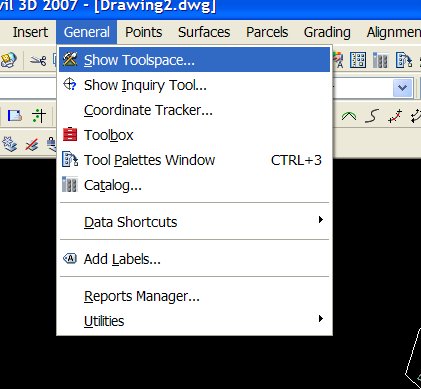
You can find General Toolspace under General>Show Toolspace


The Toolspace has two tabs:
PROSPECTOR- He's always looking for your Civil 3D Gems!


The Prospector tab is a Window's Explorer type interface that keeps all of your Civil 3D Objects (gems) close at hand.

It is similar to terrain model explorer from Land Desktop- only it is the EVERYTHING explorer.

From the Prospector you can edit object properties, creat new properties, and many more tasks.

When in doubt, right click on something in Prospector!

SETTINGS- How do you make those Civil 3D Gems Shine?!


Every diamond needs a nice setting.

Every Civil 3D object needs a STYLE and LABEL STYLES.

The Settings Tab stores all of your Civil 3D Styles- aka "How Things Look, How things are Labeled, How Commands Run" and other goodies like Pipe Catalogs, etc.

This tab is what your Civil 3D.dwt brings in.

If you don't start from a template, it would be like presenting your fiancee with a gold ore and a raw diamond. The material is there, but it looks like a pile of rocks instead of an engagement ring.

Civil 3D 2007: Finally- A Great Surface from Contour Data


So I had been avoiding learning the 2007 demo for a few weeks because I was working out this really great procedure for dealing with aerial topo. You know how it is so big and hard to manage and you are lucky if your contours are even close to theirs after you build the TIN?

So I thought I was really doing well. After about 10 pages of screen captures, drawing scurbs, Map tools and weed outs, I could get contours that we almost right.

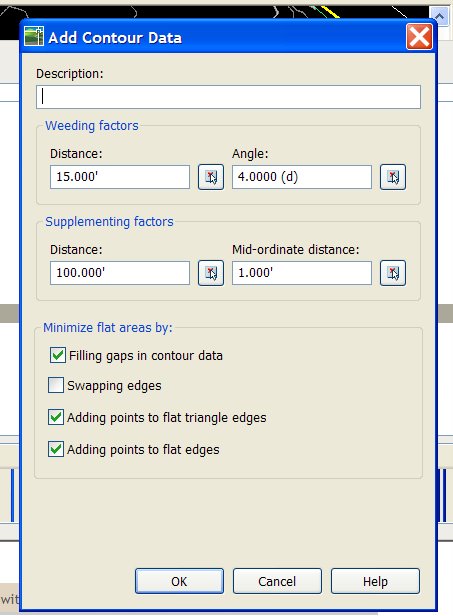
So I sit down and learn the 2007 demo and the FIRST THING IT DOES it show you how there is a tool built in to MATCH CONTOURS THAT YOU ADD TO A SURFACE!

I almost had a heart attack. But it is truly amazing.

Just pick the contours you receive as data (Aerial topo, outside survey, your hand drawn extra contours, etc) and BANG- you've got a great TIN with contours to match.

Add up all the time you spent wrestling with aerial topo and that ALONE is worth installing 07.

It is, however, always best to build a surface from tight data such as points, breaklines, etc. but that is not always possible.

Monday, May 08, 2006

This is adapted and refined from an earlier post. Enjoy.

Keeping Yourself Sane When Inheriting Data from Outside Sources
By Dana Breig Probert, Cadapult LTD.

In today’s world of streamlined and sleek engineering offices, we often find ourselves collaborating with outside firms. In theory, this is a wonderful idea. Let the surveyors specialize in what they do best- surveying. Let the Land Planners work their art and magic. Then, the Architects add their panache. Finally, the Civil Firm gets the data.

Tell me which of the following scenarios best describes what happens once you receive this data:

1.You receive an email with a well formatted drawing, detailed explanations and field notes, a Land XML file and other supporting data. You open the files and understand everything. The data imports smoothly into your version, including breaklines, terrain models, alignments, parcels, etc. You smile and begin happily grading, designing pipes, and whistle while you work.

2.You receive a drawing of an unknown AutoCAD version. After several phone calls and much struggling you manage to open the drawing. Once you open it, it is spaghetti of linework, points, and text. There are about 100 layers with cryptic names. You receive no field notes. You spend about 2 days messing with the data to get it to work in your format. Then, you run into the surveyor at Starbucks and he mentions that he placed the points in the drawing so that North was actually 45 degrees to the left. So now, all of your bearings are wrong and what you thought was state plane was actually an assumed coordinate system referenced off the rodman’s 57 Chevy rear left tire. After crying into your Venti Mocha, you stumble back to the office and spend another 3 days fixing your work only to get a fatal error and an unrecoverable drawing. Which might be a blessing- since you are back to a fresh (?) start.

3.You don’t work with outside firms anymore ever since your health plan stopped covering your emergency visits to your shrink.

There is no perfect way to share data between companies UNLESS you set up project wide standards and make sure everyone collaborating on the project follows them. I would be extremely happy to help you do this with your partners. Email me at dana.probert@cadapult.net and we’ll talk.

The best thing to do: Screen your collaborators. Inform them of your standards. If they need help getting their data into your format, email me and I can work with them to achieve a smoother transition.

Until then- here are some tips to help you when you work with outside firms. This is mostly geared towards outside surveyors, but it is a useful list no matter who you get data from: Architects, Landscape Architects, Planners, Civil Engineers, Structural, etc.


ASK THESE QUESTIONS

1.May I have a copy of your field notes? Field book? Pre-field visit meeting notes?
2.May I have a copy of the deed work? Plats? Historical Documents?
3.May I have a copy of your standard field codes?
4.What did you intend to pick up out in the field?
5.What did you actually pick up? Boundary? Topo? Points?
6.Do you do Field to finish (ie does your linework import with your points)?
7.How did you pick it up? Data collector? What kind? By Hand?
8.What software do you use to process your data?
9.Are elevations valid for topo- for example: Top of Hydrants or Ground Elevation? Wetlands Flags- did you have to hold the rod WAAY over your head to get the location, or is the elevation valid?
10.What Coordinate system- including horizontal and vertical datums? Assumed? State Plane? Other?

DATA PROCESSING
1.What are you sending me? Drawing? What format? ASCII file of points?Land Desktop project? Civil 3D drawing? Land XML? Something else?
2What do you do? Simply dump points? Field to finish linework? Hand linework? Create breaklines? Build TIN? Hand Contour?
3.If you build a TIN- What did you use to build it? Better yet- how can I accurately recreate it?
4.How do you generate TINs? Do you use points? Breaklines? Boundaries? Hand Edit Contours Once Created? Draw Polylines?
5.On a scale of 1 to 10, how good would you say this TIN is? What are its weaknesses? What should I NOT use this TIN for?

DRAWING CLEANLINESS
1.Do you use Layouts/Paperspace or just Model space?
2.Model drawn 1:1?
3.North up? Where is north?
4.Do you have standard layers? May I have your standard layer list?
5.Do you know how to use the layer translator? Can you please translate your layers to our standards before sending?

ONCE YOU GET THE DRAWING IN HOUSE- SCRUB IT!!
1.Save what they send you- read only- someplace safe
2.Open the drawing. Save drawing in YOUR version of AutoCAD with a different name.
3.AUDIT the drawing. Type Y to accept fixing of errors.
4.Explode things they might have sent you as blocks- ie xrefs, contours, etc.
5.Remove unnecessary lines, text, misc garbage
6.Translate layers to YOUR standards
7.Aerial topo or other heavy contours- weed vertices using Land Desktop or Map tools
8.Delete unnecessary objects- blocks you won’t use, their title information, their extra text
9.Use Map Tools for drawing cleanup
10.Decide how to recreate their surface, if any
11.PURGE
12.Change text styles to match your fonts
13.Purge
14.Purge
15.Audit
16.Purge
17.Make North up if not already
18.Transfer Coordinate Systems if not already
19.Make model space 1:1 if not already

NOW- MAKE IT YOURS
1.Once clean, start NEW Civil 3D (or Land Desktop, Map, Whatever) drawing and insert your scrubbed drawing as a block at 0,0,0 explode on import (or better yet, make a wblock of the original drawing, THEN insert the wblock)
2.Recreate surface, if recreating from tin, erase tin lines
3.Once your contours match theirs, erase their contour lines
4.Revisit- what is necessary
5.Create point groups assign styles
6.Create parcels
7.Delete unnecessary linework as it is replaced by Civil 3D Objects

PROTECT YOUR WORK
1.Do Land XML Exports once a day- or at critical junctions especially if you are doing a lot of work like parceling and creating alignments. You can erase yesterdays or keep them if disk space is not an issue, or just keep the ones that you want to remember (ie when the client wants a new lot configuration)
2.Once a day, backup your drawing someplace safe. I.e. if you work on the network, backup to your hard drive or another designated spot. Good File Management is critical to make sure you are not working in your backup file.
3.Have your client or subcontractor call me and I can get you all in the same version and work out procedures for everyone so data goes smoothly
4.Other things to consider: Publish standards for submitting to you. Charge more when data comes in a mess. Encourage clean data and encourage teamwork.
5.Any other ideas? Tips? Pitfalls? Email me dana.probert@cadapult.net and I can add them here.
6.Commit to a version and stick with it. If you, or your partners would like some help finding the best software match, email me and I can help.

The list above won’t guarantee that sharing data will be all happiness and sunshine, but it will give you a starting point to help keep yourself organized and get you to a point where you can start YOUR work as soon as possible.

Thursday, May 04, 2006

UNDER CONSTRUCTION!!

Bear with me... my HTML is fiercely rusty. Amazing how spoiled I got with Front Page. I am trying to get the blog looking good. so the format is a bit weird as I brush up.

Dana

Wednesday, May 03, 2006

We're Taking this show on the road!

2007 Civil and Mapping CAD Clinics
For Engineers, Surveyors, Landscape Architects, and Land Professionals of all Kinds

Come learn about how Civil 3D 2007 and Map 3D 2007 can help you get your job done.
All events are no charge and include breakfast!

All events registration and food at 8:30AM
Speakers 9AM-12PM unless noted otherwise

To register- www.cadapult.net/events.cfm

5/10 Dover Downs
5/12 Holiday Inn Boardwark Atlantic City
5/16 Philadelphia Chamber of Commerce (9:30AM)
5/17 Wilmington Riverfront
5/22 Netherland Inn Strasburg, PA
6/13 Sheraton Great Valley Frazer, PA

We'll have the Civil/Mapping group THE WHOLE TIME so we can cover great industry-specific information!

Detailed Civil/Mapping Agenda:

1. Breakfast and Registration
2. Why Civil 3D? And what the heck is it anyway? Whatever happened to AutoCAD?
3. Life Before Civil 3D and Life After Civil 3D: A Site Plan Study
4. Civil 3D Nuts and Bolts: A demonstration of a sample project
5. Civil 3D Survey Tools- Yes! They are finally integrated.
6. Civil 3D new features-Why install (or upgrade to) 2007? (including discussions of vault and project data sharing)
7. Map 3D and Raster Design- tools every engineer needs to know, plus hard-core mapping including connecting to live sites, thematic mapping and others
8. What's new in AutoCAD? 3D tools, easy visualization and things you may have missed from the last few releases.

The blog will be back in action this week...stay tuned.

Friday, December 02, 2005

LOOONG time coming...

Sorry folks- been out Driving Civil 3D Adoption and by the end of the day these eyes are tired! But good tired.

Just got back in from Autodesk University and THERE IS SO MUCH TO TELL. It was great. I'll write up as much as I can.

More later...

Monday, September 05, 2005

Environmental Series...

Base Plan Info Availability
Integrating CAD and GIS
Converting Raster to Vector- inheriting old paper drawings
Detailed breakdown of:
national wetlands inventory
FEMA information
delaware dataMIL
pennsylvania GIS data
new jersey GIS data
Arc vs Map

Monday, August 01, 2005

How to make your first experiences with Civil 3D positive experiences

How to make your first experiences with Civil 3D positive experiences

1. CAD standards- gotta have ‘em.

Let’s say, hypothetically, you started your own engineering firm. Every day you come in to the office and see more and more papers EVERYWHERE. On the floor. On the desks. You can never find anything!!

So what do you do?

You run down to the Office Supply Store and the slick salesperson talks you in to the state of the art filing cabinet.

So you go back to the office and you dump all of your stuff into this cabinet.

The office looks GREAT.

But every time you open the filing cabinet you think that the sales person ripped you off because you still can’t find anything. The mess is just hidden inside.

Moral of my dumb little story- YOU WOULD NEVER EXPECT A FILING CABINET TO WORK WITHOUT A FILING SYSTEM.

You would NEVER BLAME THE FILING CABINET.

Why do you expect your drawings to be produced effortlessly without CAD Standards?

And, why do you blame Civil 3D? (Or Map or Land Desktop or Whatever else you use?)

2. Clean up your inherited data! See inherited data checklist

You cannot help the data you get (unless you screen your subconsultants and hold them to your standards). But you can help what you put in to your drawings. What may be perfectly useful in your surveyor’s office could contribute to GIGO and corruption in your office. Know your data and know how to clean it up, translate it and make it good for YOU.

3. ALWAYS start with a Civil 3D Template

If you do not pick a Civil 3D template you will email me and tell me how much Civil 3D sucks. It doesn’t. You just have to pick a template. Until you create your own (or have me create it for you), choose the Imperial by Style template. Why? Because everything is mapped to layer zero to begin with, so that you can map it to your own layers when you are ready.

4. Start with Pilot Project

Save cold turkey for after Thanksgiving.

Pick your most gearhead, giddy about technology project team. You know the guys- they build their own computers. They never buy intel. They had CD burners in 1995. They watch Tech TV. They would stay up all night to figure out how to use Civil 3D and Viz to render a valley scene from Lord of the Rings.

These guys and gals will lay the groundwork for your firm’s Civil 3D standards and procedures.

Pick a relatively small project- good examples: shopping centers, straightforward subdivisions, stream restorations, etc.

If you do not have a team of gearheads, never fear. Civil 3D really isn’t that bad and the technology is no longer in Beta form. This is the release for everyman. Call me and I can help you through your Pilot Project and help you get your standards established.

6. If you remember nothing else- THE TOOLSPACE IS YOUR FRIEND

General>Show Toolspace

The Toolspace is your command center. When in doubt, go to the toolspace and right click on something.

5. Remember the DON’Ts

Don’t open a drawing created somewhere else besides Civil 3D. Why? Not because it won’t open, but because Civil 3D won’t understand its project data. You also won’t have any styles. Best bet? File>New>Choose a template. Insert necessary linework as a block. Then, use LandXML or Import Data From Land Desktop to get the project data

Don’t expect it to be Land Desktop. There are no Land Desktop style Project Paths, Projects and Databases. Layers take on a new meaning. Erasing objects actually erases them. There is much more to learn here. But the most important thing to learn is that Civil 3D is not Enhanced Land Desktop.

Don’t get bogged down in “knowing it all” and having it all perfect. Guaranteed I could show you menus in MS Word you have never seen let alone used, but that doesn’t stop you from opening up MS Word every time you need to type a letter.

Don’t explode anything. If you feel the itch to explode something EMAIL ME FIRST. Tell my why you want to explode it. Keep your fingers off of the mouse. Go for a walk. Go get a soda. Check out CNN.com.

Don’t give up! You have survived Engineering School. Or Tech School. Or Planning School. Or Landscape Architecture School. Or the School of Hard Knocks. You have survived DCA, Softdesk, R14, Many Releases of Land Desktop not to mention Betamax, VHS, Cassettes, CDs, DVDs and MP3s. Civil 3D is a whole lot more fun that any of that stuff. It is more visual and intuitive than Land Desktop. You will survive this and you will love this.

In a year, you will say things like “I can’t believe we used to have to build surfaces after adding data and we couldn’t see the contours change right away. Man, that was the stone age”

6. Keep your drawing clean

Audit your drawing regularly. Keep junk out. By junk I mean- Land Desktop points, softdesk points, HUGE contours (like aerial topo). Save the originals in their own file, use the data to create Civil 3D data and get rid of the junk!

7. Make sure you are asking Civil 3D to do things that are possible

The Parceling routine cannot make 5 acre lots with 100 foot depths and 50 feet of frontage. It will crash if you ask it to do that. It also cannot fillet intersections at 25 ft if you have drawn horizontal curve radii smaller than that.

Yes, Civil 3D should politely say “Does not compute” and leave you alone, but sometimes it gets angry and kicks you out. Worse yet, if you have a drawing full of junk and errors it may corrupt itself leaving you hoped. We’ll talk about backup in a minute, but it helps to think a little about what you are doing before you do it.

8. Create Backups in case you accidentally ask Civil 3D to do something it cannot do

This will happen. You are learning the right order of mouse clicks and what the parameters are. If you ask Civil 3D to do something it cannot do and it kicks you out, you will want a backup.

Exporting LandXML is a great way to preserve this data. It takes a second. It doesn’t cause confusion since it is not another dwg file. And if you are taking advantage of the Civil 3D objects, most, if not all, of your linework will be recreated from an import of LandXML.

I am recommending doing a LandXML export once an hour or so when you are in heavy object creation. For example: If you are subdividing a large site, creating a lot of alignments, creating a lot of points.

Autosave and I have a mixed relationship. I have never been able to do much with the .sv$ format if I can even find the file. Plus, autosave tends to kick in when I am in the middle of something and it messes me up. I’d rather get in the habit of hitting the quicksave button every 15 minutes under my control.

At critical junctions, save a copy of your drawing somewhere safe- locally or otherwise.

9. Seek intro training at the very least
Cadapult offers a one day quick orientation to Civil 3D that is designed to give you an idea of what is possible. I can also come to your site to do the Civil 3D Workshop. Also try tutorials that come with the program. Email me for more resources.

10. Make a project commitment and don’t go back

Take it to Civil 3D and unless you absolutely must move it out- leave it there.